Aerospike Evaluation on Python SDK
A hands-on evaluation of Aerospike: running the NoSQL database locally in Docker, driving it from the Python SDK, and what the benchmarks showed.
On a fine morning, I got an email saying that I was assigned to evaluate Aerospike, and I researched Aerospike. I thought of sharing my experience, which I got from the Aerospike documentation, and my experience on my local PC.
Advantages and What is Aerospike ❤
Aerospike is a high-performance distributed NoSQL database. It provides high performance via the DRams and SSD flash storage. It’s the architecture of scaling horizontally across nodes with low latency and high throughput that attracts many real-time data solutions to Aerospike. When it comes to databases like MongoDB provides Horizontal scaling, but it should be configured Aerospike does this in an automatic way. When it comes to data models, Aerospike supports many. The main ones are key-value stores and document types, and various defined types are there, which is one of the added advantages of Aerospike. Maps, lists, and hyperlogs are some of those. When it comes to real-time applications, high availability is one of the key features, and Aerospike provides it in a guaranteed structure and supports automatic failovers with data durability guarantees as well. Finally, I saw in Aerospike that the consistency model is configurable, and it can be configured for whatever the application is based on the requirements as well.
Key Features that I Saw and my evaluation of those using Python ✌
Performance
Aerospike provides high performance and low latency, which make it ideal for real-time data processing and fast data access.
Scalability
Aerospike is designed to be highly scalable, and it can handle large volumes of data and traffic loads.
Data model
The key value data model is simple and flexible; it allows you to store and retrieve data quickly and efficiently as well.
Consistency
Aerospike guarantees strong consistency, ensuring that all nodes in the cluster see the same version of the data at all times.
Ease of use
Designed to be easy to use and integrate with existing applications and frameworks. Frameworks like Kafka and Hadoop Scala are supported by Aerospike.
Enterprise Grade Security
Aerospike also provides comprehensive security features, including encryption at rest in transit, access controls, and auditing.
This is how I Tested Aerospike 😎
Aerospike provides a 60-day trial access to the Aerospike Enterprise Server at this link.
https://aerospike.com/get-started-aerospike-database/
I tried to install the Aerospike container on my Windows Docker container, but due to some administrative privileges, I couldn’t do it. Then I tried the same with my personal laptop, which is a MacBook, and it turned out well. Since I requested the trial, I had the key file with me. So, I added that to the aerospike’s file and built the aerospike image. Finally, I run the Docker image once the Aerospike build is complete. These are the terminal codes that I used;
FROM aerospike/aerospike-server:latest

ENV AEROSPIKE_NAMESPACE mynamespace
ENV AEROSPIKE_SERVICE_PORT 3000

ADD aerospike.conf /etc/aerospike/aerospike.conf

docker build -t aerospike .

docker run -d --name aerospike -p 3000:3000 aerospike
After its run, you can see it in the docker container area with a green icon saying it’s running and it’s running on port 3000 Also, you can easily telnet and see if it’s running. Then the setup part is done. Now let’s take a look at the Python code.
Forease of the demo, I have used Jupyter Notebook as the IDE, and this is how I started.
# These are the libraries that I used
import pandas as pd
from tqdm import tqdm
import time
import random
import pymongo
import aerospike
import pprint
pp = pprint.PrettyPrinter(indent=2)

# Configuration adding
config = {
 'hosts': [('localhost', 3000)]
}
client = aerospike.client(config).connect()
This is how I defined the Aerospike client, configured it, and got it connected. By default, there is no password, but you can configure a username and password for the aerospike.
# Create a test namespace and set
namespace = 'test'
set_name = 'demo'
This is how I defined my namespace and the key-value store set name. And now I’m going to generate 100,000 dummy data points for this exercise.
# Generate some sample data
num_records = 100000
records = []
for i in range(num_records):
 key = (namespace, set_name, str(i))
 record = {
 'name': 'Test user',
 'age': 25,
 'email': 'user@usereee.com'
 }
 records.append((key, record))
And then I tried to insert this data into Aerospike. It took 1 minute and 31 seconds on my local Mac to insert this data using this method.
# Write the data to Aerospike
start_time = time.time()
for key, record in tqdm(records):
 client.put(key, record)
write_time = time.time() - start_time
print(f"Inserted {num_records} records in {write_time:.2f} seconds")
Also, read the data from the aerospike I used this query, and it took around 0.54 seconds to read 100,000 rows of data.
# Read the data from Aerospike
start_time = time.time()
def process_record(key, metadata, record):
 try:
 print (key, metadata, record)
 # Process the record here
 pass
 except Exception as e:
 # Print the exception and continue iterating
 traceback.print_exc()
 pass

client.scan(namespace, set_name).select('name','age','email').results()
read_time = time.time() - start_time
print(f"Read {num_records} records in {read_time:.2f} seconds")
Then finally, I cleaned up the aerospike and closed the connection using the below code. Even though it took some time to insert, the data retrieval part is pretty fast locally. I’m sure that these numbers will definitely change in cloud environments Also, the Aerospike team requests servers with SSDs, so it will be an additional factor for fast data retrieval or handling and working with multiple nodes as well. But in this, I have used my local machine with a single node without any SSDs.
# Cleanup
for key, _ in records:
 client.remove(key)

client.close()
And the next awesome thing I wanted to try out was to check how it worked compared to other NoSQL databases. So, I took MongoDB to test Aerospike, and for those who wanted to think why MongoDB is because it is also a NoSQL database that caters to the same use case but is an open-source one, in the same way, I installed a MongoDB server on my Mac through a local one. Then this is how I benchmark Aerospike and MongoDB.
# Connect to MongoDB
mongo_client = pymongo.MongoClient('mongodb://localhost:27017/')
mongo_db = mongo_client['test1']
mongo_coll = mongo_db['demo']

# Connect to Aerospike
config = {
 'hosts': [('localhost', 3000)]
}
aero_client = aerospike.client(config).connect()
namespace = 'test'
set_name = 'demo'
Again, I’m defining and configuring both Aerospike and MongoDB configurations. And then I generate 100,000 records as a sample, as in the previous example in the below code.
# Generate some sample data
num_records = 100000
records = []
for i in range(num_records):
 key = (namespace, set_name, str(i))
 record = {
 'name': 'John Doe',
 'age': random.randint(18, 50),
 'email': @example.com">f'johndoe{i}@example.com'
 }
 records.append((key, record))
First, I tried MongoDB, and it took 1.53 seconds to insert data into MongoDB. This is the code that I used.
# Insert the data into MongoDB
start_time = time.time()
mongo_coll.insert_many([{'_id': str(i), 'data': record} for i, (_, record) in enumerate(records)])
write_time = time.time() - start_time
print (f"Inserted {num_records} records to Mongo DB in {write_time:.2f} seconds")
Then I generated key values and inserted data into the aerospike, and it took 1 minute and 60 seconds to add data. What I see here mainly is that MongoDB itself has a batch processing method, which we used as “insert_many” in Aerospike. There is also a batch processing method, but I couldn’t try that out. Anyway, in Python, a for loop is an expensive call, and it might take some time for this, in my opinion.
# Create a list of (key, record) tuples
records = [(str(i), {'name': f'name{i}', 'age': i}) for i in range(num_records)]

# Insert the data into Aerospike
start_time = time.time()
for key, record in tqdm(records):
 aero_client.put((namespace, set_name, key), record)

# client.batch_write(records)

write_time = time.time() - start_time
print (f"Inserted {num_records} records to Aerospike in {write_time:.2f} seconds")
So that is the benchmarking of inserting values into the database, and now we are going to look at how we benchmark the reading of data by comparing Aerospike and MongoDB. First, I tried to use MongoDB to read 100,000 records, and it took 30.70 seconds. This is my code.
# Benchmark read performance for MongoDB
start_time = time.time()
for i in range(num_records):
 doc = mongo_coll.find_one({'_id': str(i)})
read_time_mongo = time.time() - start_time
print (f"Read {num_records} records from MongoDB in {read_time_mongo:.2f} seconds")
Then I tried the same with Aerospike, and it took 0.68 seconds to read from Aerospike.
# Benchmark read performance for Aerospike
start_time = time.time()
aero_client.scan(namespace, set_name).select('name','age','email').results()
read_time_aero = time.time() - start_time
print (f"Read {num_records} records from Aerospike in {read_time_aero:.2f} seconds")
Overall, this is the finding that I got by benchmarking these two databases.
+----------------+----------------+---------------+
| Operation | Aerospike | MongoDB |
+----------------+----------------+---------------+
| Reading data | 0.68 seconds | 30.70 seconds |
| Inserting data | 110.60 seconds | 1.53 seconds |
+----------------+----------------+---------------+
Also, one of the main advantages that I learned about Aerospike is its SQL-like language.
Limitations that I see from Aerospike 😢
- Data modeling complexity
Aerospike requires careful data modeling to ensure optimal performance, which can be challenging for some use cases. Because it takes some time to convert a dataset into key-value stores. To mitigate this, we can use various alternatives, as shown below.
a. Using AS-Loader (load the data from CSV files)
b. Python & Spark Scripts
c. Using Kafka, JMS, and Pulsor connectors
d. Using partner solutions for CDC-based migration.
- Limited SQL Support
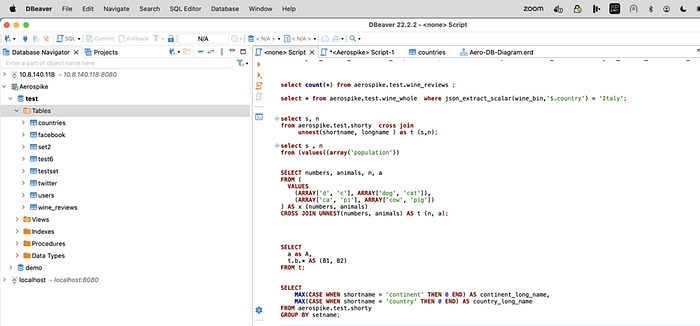
Aerospike generally supports a limited subset of SQL, which may be difficult for full-featured SQL users. However, you can use the Trino/Starburst Connector to run complex queries in Aerospike. You can also call the Trino/Starburst JDBC in your Python program in order to run SQL queries (however, I would recommend the Aerospike Python client library with filter expressions). Below is a screenshot connecting Trino through DBeaver to execute complex SQL queries on Aerospike.
- No Built-in Backup and Restore method
Aerospike does not provide any built-in backup and restore functionality, This could be a limitation to ensure data durability and recoverability. However, for DR, we can use the XDR feature of Aerospike.
- Limited community support
It is not as widely used or supported as some other databases, which can make it more challenging to find help and resources. That’s one of the reasons that I wanted to contribute to the community by writing the article as well.
- Database Querying tools or Database diagram tools support
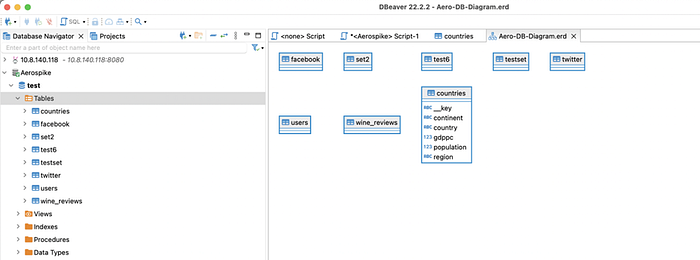
Aerospike requires no join, and sets (tables) are dynamic, i.e., the column definition changes record by record. Depicting it on a data diagram is not easy. However, you can try DBeaver (an open-source tool) for static sets only using Aerospike JDBC connectivity. Below is a screenshot from DBeaver to display the DB diagram on Aerospike.
Also, you can try connecting tools like DataGrip by using the JDBC driver.
- Distributed Nature
Its distributed architecture may need an expert to operate and manage. But it can be monitored in multiple ways.
a. Commandline interface (asadm tool)
b. Using pre-built monitoring reports on Grafana & Prometheus
https://aerospike.com/products/monitoring-stack/
c. Aerospike Management Console → Roadmap to upgrade for monitoring & observability
- Architecture
It could be better and faster for reading and writing, but it may not be well-suited for complex data analytics and reporting. Aerospike is designed for OLTP queries with faster read/write performance and low latencies. For AI and ML, Aerospike has Spark connectors that help offload data on Spark to run the models and ingest the output back into Aerospike. It avoids OLAP queries in Aerospike directly; however, if it is required, we recommend it through the TRINO and Starburst connectors.
References 👍
First published on suranga.xyz at /aerospike-evaluation-on-python-sdk/